
My Memorial Hermann™
Memorial Hermann Health SystemMedical
4.3278.00 Reviews
- Version
- 11.7.2
- Installs
- 100.00K
- Age Rating
- Everyone
Screenshots
Our Review of My Memorial Hermann™
 Analysis by Appyee
Managing healthcare is rarely difficult because of one dramatic task. The frustration usually comes from small moments: finding the right appointment detail, checking a message while tired, remembering which result belongs to which visit, or trying to handle paperwork when you are away from home. My first impression of My Memorial Hermann™ is that it is built around reducing that everyday friction for patients using Memorial Hermann services.
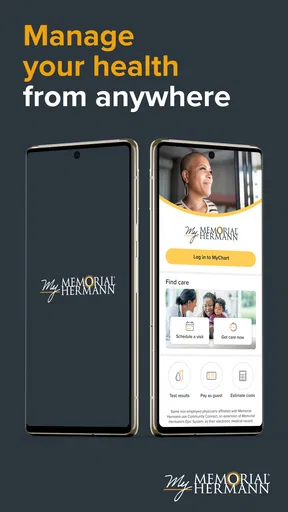
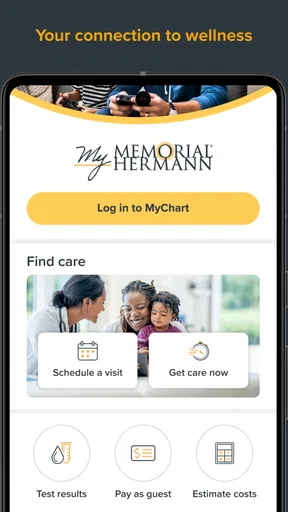
This is a free medical app from Memorial Hermann Health System, and it brings the My Memorial Hermann and MyChart experience into one mobile place. It is aimed at people who want a more direct way to stay connected with their care rather than relying on phone calls, paper documents, or several separate routines. The app is rated for Everyone, runs on operating system version 11 or later, and the current version is 11.7.2.
I would not describe it as an app that replaces a healthcare professional or solves every administrative problem. Its value is more practical: it gives patients a digital doorway into their health-management tasks. That makes the quality of the interface especially important, because healthcare apps are often used when people are anxious, unwell, distracted, or helping someone else. In my experience, clarity matters here just as much as the number of available tools.
How the app feels to use in real life
I find the app most useful as a mobile starting point for Memorial Hermann healthcare tasks, especially when I need to get oriented without gathering paper notes or sitting down at a computer. In this section, I’ll focus on what that central role changes in an ordinary routine—and why having one familiar place to begin can help, even when the next step still calls for a phone conversation.
Readability and navigation for everyday health tasks
The strongest reason to use this app is convenience. Instead of treating healthcare as a chain of unrelated calls and reminders, it gives the user a central place to begin. That is useful when I am trying to orient myself quickly: I want to know where to look first, what needs attention, and which action belongs to my current care.
That simplicity is particularly helpful for someone who does not use medical technology often. A patient may open the app only when a visit is approaching or when a new health-related task appears. In that situation, a clean path to the relevant area is more valuable than an interface packed with advanced options. My Memorial Hermann™ feels most suitable for users who want a recognizable patient portal rather than a separate wellness dashboard full of unrelated tracking tools.
There is also a useful difference between reading health information and merely receiving it. A patient portal can become a personal reference point after a visit, when details are easy to forget. I would use it to revisit information at a calmer moment, prepare questions for a follow-up conversation, and keep my own understanding of a care plan organized. That does not replace professional interpretation, but it can make the next conversation more focused.
For older adults or people who are less confident with smartphones, the main test is not whether every function exists. It is whether the user can recognize the next step without guessing. I found the app’s purpose easy to understand, but healthcare terminology can still make any portal feel more complicated than a normal messaging or calendar app. Someone assisting a parent or partner may need to spend time explaining the difference between a message, a result, an appointment-related item, and a general account task.
That is why I recommend setting it up before an urgent need arises. Installing a patient app while waiting for an appointment, sitting in a hospital parking area, or dealing with a worrying symptom is a poor time to learn the layout. A short, calm first session makes it easier to recognize where important information appears later. I would also keep notifications purposeful rather than allowing every alert to become background noise.
The app’s average rating is 4.3 from around 500 ratings, with more than 200 written reviews, and it has passed 100,000 installs. Those figures suggest that it has found a useful role for a substantial group of patients, while also reminding me that a patient portal is judged very personally. A smooth experience for someone checking a routine detail may feel very different from the experience of someone managing complex care or helping another person.
Motor, visual, hearing, and cognitive considerations
My Memorial Hermann™ is most inclusive when it reduces the number of physical and mental steps needed to complete a task. That matters for users with limited dexterity, hand tremors, fatigue, or pain. A phone-based portal can be easier than a phone call for someone who cannot comfortably hold a conversation, but it can also become tiring if navigation requires repeated precise taps or extended reading.
I would use the phone’s own accessibility settings alongside the app. Larger system text, stronger contrast, screen magnification, voice control, and spoken feedback can make a meaningful difference, especially for users with low vision or temporary visual strain. These adjustments are not a substitute for thoughtful app design, but they can turn a difficult screen into a manageable one. The practical tip is to test those settings before needing to read a time-sensitive health message.
People with hearing loss may appreciate a digital route for handling healthcare communication because it does not depend entirely on hearing a call clearly. Someone in a noisy environment, someone who cannot speak privately, or someone who processes written information more comfortably may also find a portal preferable to a conversation. The trade-off is that written communication can require patience and careful reading, particularly when medical language is dense.
Cognitive load deserves equal attention. When I am worried, I do not absorb information as efficiently as I do on an ordinary day. A patient portal should therefore be approached in small tasks: open the app, identify the immediate purpose, complete that one action, and stop to review what happened. I would avoid tapping through several areas quickly, especially if I am trying to distinguish a new item from an older one.
Caregivers may also use the app as part of another person’s healthcare routine, but that situation requires extra care with identity and privacy. I would never assume that having access to a family member’s phone automatically gives me the right to manage their health information. The safer approach is to use whatever authorized account or sharing arrangement the healthcare provider supports, and to keep personal accounts separate on shared devices.
For users with limited digital experience, the app is likely easier when paired with a simple personal routine. For example, I would keep the phone’s text size consistent, use the same login method each time, and write down questions before opening a health message. Those small habits reduce the chance of losing the original purpose of the session. They also help a family member provide assistance without taking over every part of the process.
Using it away from home, under pressure, or with limited connectivity
The most realistic scenario is not a relaxed Sunday afternoon. It is the moment after a visit, when I am at home trying to remember what I need to do next. I might open the app to review the information connected with that visit, check whether there is a new item requiring attention, and make a note of questions for the next conversation. Having a single starting point is much less stressful than searching through email, paper notes, and a phone’s call history.
Another useful situation is travel across town or a change in daily routine. A patient may need to check a healthcare detail while at work, caring for a child, or sitting in a waiting room. A mobile app is naturally better suited to those moments than a desktop-only portal. It supports the idea that health administration happens throughout the day, not only when someone is seated at a computer.
Still, mobile access does not mean access everywhere. A weak signal, a nearly empty battery, a locked-down work phone, or a person who cannot safely look at a screen can all interrupt the process. I would not make the app my only source of information for something I already know I will need during travel. Keeping essential appointment details in an appropriate offline form is sensible, while avoiding unnecessary copies of sensitive health information on shared or unsecured devices.
For users who are easily overwhelmed in public places, the app can be helpful because it allows a quieter written interaction with healthcare tasks. At the same time, a busy environment makes privacy harder. I would use headphones only when appropriate, avoid opening sensitive information where others can see the screen, and rely on the phone’s lock and privacy controls. Accessibility is not only about whether a person can operate an app; it is also about whether they can use it safely in their actual surroundings.
People with temporary limitations may benefit just as much as people with permanent disabilities. Someone recovering from surgery, dealing with medication-related fatigue, experiencing a migraine, or unable to speak comfortably may prefer short digital sessions. In those cases, the best workflow is to do the least demanding task first and leave complex questions for a time when another person can help or a healthcare professional can provide context.
Where the usual alternatives may work better
The obvious alternative is calling the healthcare system. A phone call can be better when the situation is urgent, emotionally complicated, or too difficult to explain through a screen. It is also the better choice when I need clarification rather than simply access to information. The app can organize the administrative side of care, but it should not become an excuse to delay help when symptoms or timing make direct contact important.
A desktop patient portal may suit people who have low vision, limited hand mobility, or difficulty reading a small phone screen. A larger monitor and physical keyboard can make long messages easier to review and compose. In contrast, the mobile app is more convenient for quick checks and for people who do not regularly use a computer. The right choice depends less on loyalty to one format and more on the task in front of me.
Paper notes still have a place. A printed appointment reminder or a handwritten list can be easier for someone who does not use smartphones, and it remains available when a device is unavailable. The weakness is that paper can become outdated, misplaced, or difficult to share with the right person. My Memorial Hermann™ is more useful when I need a current digital starting point, while paper can serve as a backup for simple reminders.
General health apps are also different from this one. A fitness tracker or symptom journal may help me notice patterns in daily habits, but it is not the same as accessing a provider-connected healthcare experience. Conversely, someone looking mainly for exercise goals, nutrition logging, meditation, or broad educational content may find a general wellness app more appropriate. This app makes the most sense when the user’s priority is interacting with Memorial Hermann-related care tasks.
Remaining barriers and points of friction
The biggest limitation is that the app’s usefulness depends on the user’s relationship with Memorial Hermann. Someone outside that care system will not gain much from installing it simply because it is free. The price removes one barrier, but it does not make the app universally relevant. I would skip it if I were looking for a general medical reference, a symptom checker, or a way to manage care from an unrelated provider.
Healthcare portals can also feel fragmented when a person receives care from several organizations. Even if this app is convenient for Memorial Hermann interactions, I may still need other portals, phone numbers, or documents for specialists and services elsewhere. That is not a failure unique to this app, but it affects the real-world experience. People with complex care should expect to maintain more than one channel and should avoid assuming that one portal represents their entire medical history.
Login and account security can create friction, especially for users with memory difficulties or limited dexterity. I would choose a secure method that I can reliably use, avoid sharing credentials casually, and make sure the recovery details are current. A caregiver should not solve convenience problems by storing sensitive access information in an exposed note. A few extra seconds spent on security are worthwhile when the account contains personal health information.
Another barrier is interpretation. A digital result or message may be easy to open but difficult to understand without context. I would not treat a portal entry as a diagnosis, and I would not make a major health decision based only on a phrase I found on a screen. The app is strongest as a communication and organization tool; it is weaker when the user expects it to explain every medical nuance without professional guidance.
Notifications can help users remember that something needs attention, but they can also create anxiety or be missed among unrelated alerts. I recommend reviewing notification behavior during setup and checking the app directly when a healthcare matter is important. For people with hearing or attention-related needs, combining visual checks with the phone’s available vibration or spoken-alert options may be more reliable than depending on one signal alone.
Who I would recommend it to
I would recommend My Memorial Hermann™ to patients already connected with Memorial Hermann who want a mobile way to manage the practical side of their healthcare. It is especially suitable for people who prefer written information, need access while away from a computer, or want a more organized routine after appointments. It may also help a family member who is supporting someone else, provided access is handled through an appropriate authorized arrangement.
I would be more cautious about recommending it to someone who rarely uses smartphones, has no support for account setup, or finds small-screen reading exhausting. That person may be better served by a desktop portal, a trusted caregiver’s assistance, or direct phone support. I would also steer away from using it as the main tool for urgent symptoms, complicated explanations, or care spread across many unrelated providers.
My practical advice is to install it before you need it, adjust the phone for comfortable reading, complete the account setup when you are calm, and use it as one part of a broader healthcare routine. Keep a short list of questions, check information carefully, and contact the appropriate professional when the app cannot answer the real concern. Those habits make the experience more accessible than simply downloading it and hoping the interface will do all the work.
My inclusive verdict
My Memorial Hermann™ succeeds because it focuses on a concrete need: making Memorial Hermann healthcare tasks easier to reach from a phone. I like it most as a calm, repeatable starting point for checking information and staying organized after care interactions. Its free availability and Everyone age rating make it approachable, while support for operating system version 11 and later gives compatible users a clear technical baseline.
Its inclusive value comes less from flashy extras and more from flexibility. A written mobile workflow can support people who cannot easily make calls, people who need to enlarge text, people managing fatigue, and people trying to handle healthcare in changing environments. The experience still depends on the phone, the user’s digital confidence, the complexity of their care, and the accessibility of the surrounding support.
My bottom line is simple: use it as a practical patient-portal companion, not as a substitute for care or human explanation. If Memorial Hermann is part of your healthcare routine, I think it is worth trying. If your needs are mainly general wellness, urgent medical advice, or multi-provider record management, another route may fit better. For the right patient, though, it can turn scattered healthcare administration into a more manageable part of the day.
Verdict
Strengths of My Memorial Hermann™
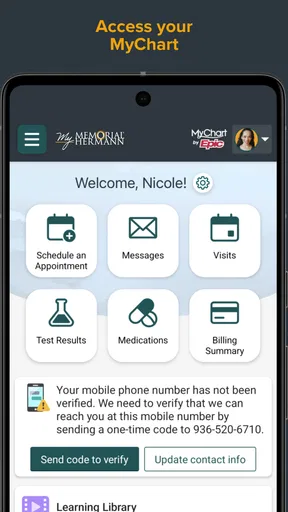
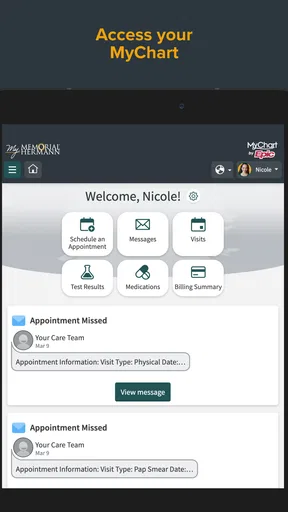
- Easy access to appointments, test results, bills, and medical records.
- Secure messaging makes it convenient to contact your care team.
- Prescription refill requests can be submitted directly in the app.
- Helpful tools support virtual visits and location-based facility searches.
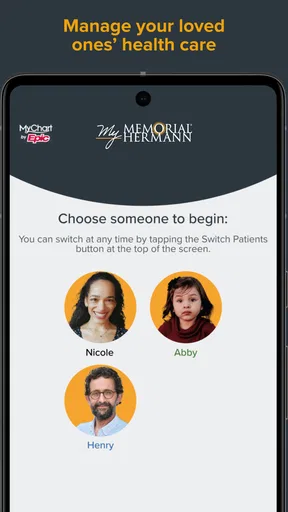
- Health information can be managed for multiple family members.
Limitations of My Memorial Hermann™
- Some features may only work for Memorial Hermann patients and locations.
- Account setup may require identity verification and existing patient information.
- Appointment options depend on provider availability and may be limited.
- Notifications and messages may not arrive instantly in every situation.
- The app’s usefulness is reduced for users outside the Memorial Hermann network.
Similar Picks in This Category
View All
WebMD: Symptom Checker
WebMD, LLC4.1

Microphone Amplifier
DOSA Apps4.2

Anatomy Learning - 3D Anatomy
3D Medical OU4.5

Period Tracker and Calendar
SimpleInnovation4.9

GoodRx: Prescription Coupons
GoodRx4.8

CVS Health
CVS Pharmacy4.5
Frequently Asked Questions
What is My Memorial Hermann™ used for?
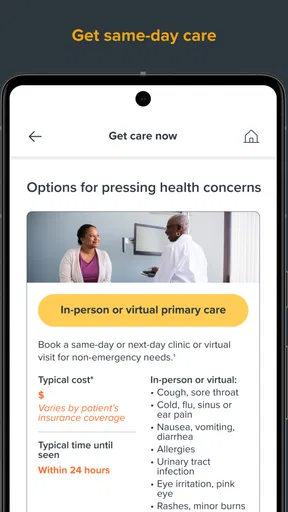
My Memorial Hermann™ is the official mobile app for managing many Memorial Hermann healthcare services in one place. After signing in, users may be able to review appointments, communicate with care teams, access parts of their medical record, view test information, manage prescriptions, check bills, and find health resources. Available features can vary depending on your location, provider, and account setup.
How do I sign in to My Memorial Hermann™?
You generally need an active Memorial Hermann patient account to use the app’s personalized features. During setup, the application may ask you to verify your identity and create or connect a MyChart-style account, depending on the current system. If you forget your username or password, use the recovery options in the app or contact Memorial Hermann support rather than creating multiple accounts.
Can I schedule appointments and communicate with my doctor through the app?
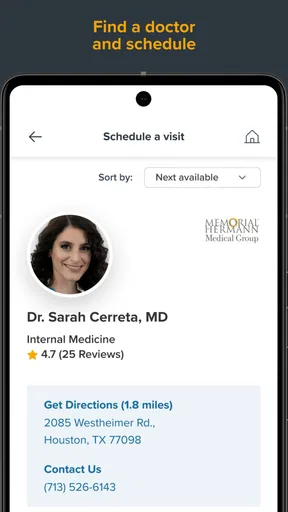
The app may allow eligible users to request or manage appointments, view upcoming visits, receive reminders, and send secure messages to participating healthcare providers. Availability is not identical for every department or clinician, and some appointments may still require a phone call. Before relying on messaging, check the expected response time and use emergency services for urgent symptoms.
Can I view medical records, test results, prescriptions, and bills in the app?
My Memorial Hermann™ can provide convenient access to selected health and administrative information, including visit summaries, laboratory results, medications, prescription-related services, insurance details, and billing options. The exact information shown depends on what has been released to your account and which services you use. Results may appear before your provider has discussed them with you.
Is My Memorial Hermann™ secure, and can family members use it?
The app is designed for private healthcare communication and typically uses account authentication and secure connections to protect personal information. You should still use a strong password, keep your device updated, and avoid accessing your account on shared devices. Parents, caregivers, or authorized representatives may be able to use proxy access, but permission and age requirements apply.
